


DRM Encryption (Experimental)
MediaShield Pro proUpdated
Pro feature. Available in MediaShield Pro.
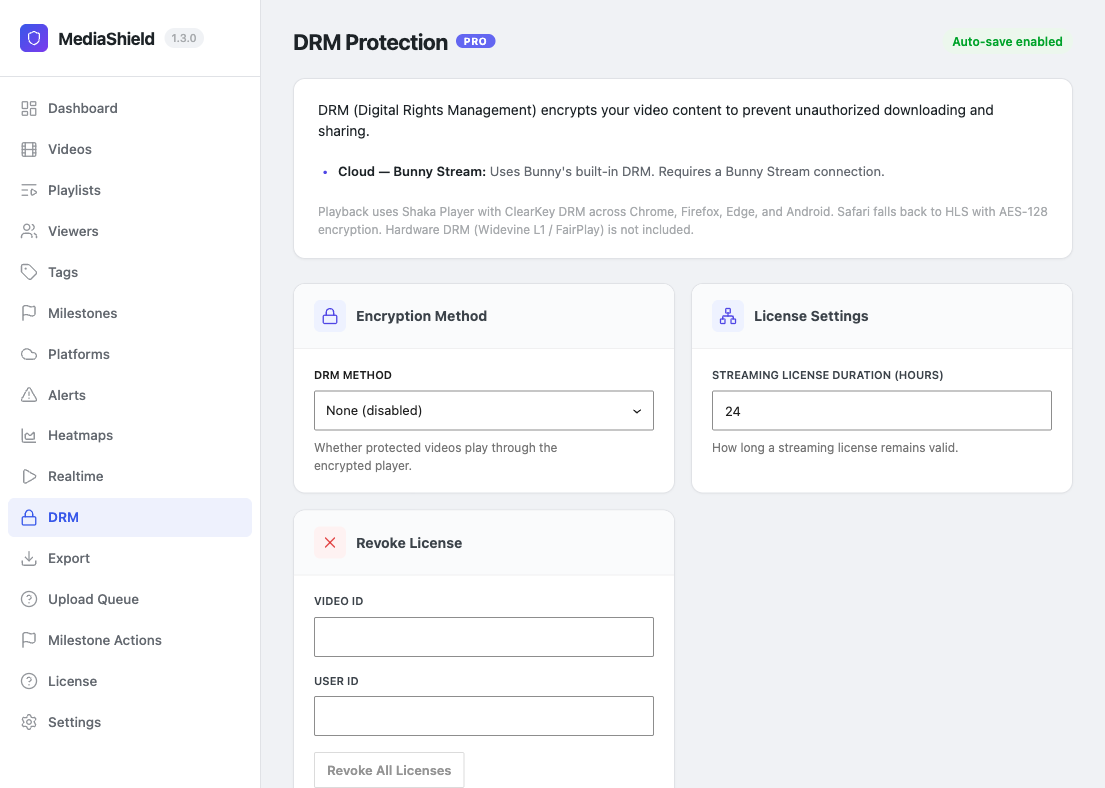 The DRM settings page. Choose a DRM method and set the streaming license duration.
Read this section before you rely on DRM for anything. DRM in MediaShield Pro is experimental plumbing, not a finished feature. Encrypted playback has never been verified end to end against a real DRM-packaged video, and several pieces a working setup needs are not wired up in 1.3.0. Do not sell or promise DRM-protected delivery on the strength of this page.
What changed in 1.3.0, and what it means for you#
Before 1.3.0 DRM could not be switched on at all. The Protection Level list on the video editor was a fixed list with no DRM entry and no way for Pro to add one, so the flag the DRM player checks (_ms_protection_level = drm) could never be set. If you believed a video was DRM-protected on an earlier version, it was not. It was served with whatever other protection level was selected.
In 1.3.0 Pro adds a DRM - Encrypted playback (experimental) option to that list, but only while DRM Method is set to something other than "None". Selecting it switches the player to DRM mode; it does not encrypt anything on its own.
Current limitations#
| Limitation | Effect |
|---|---|
| No packaging at all | The packaging code was removed in 1.3.0 because nothing called it. There is no packager, no "Package with DRM" button, and the Auto-Package toggle is gone |
| No content keys | Keys are only created during local packaging, so the key table stays empty and license requests fail with "No DRM key found for this video" |
| No player library bundled | The DRM player needs Shaka Player, which neither plugin ships or loads. Without it the DRM player logs a console warning and stops |
| AWS MediaConvert | Present in the method dropdown as "Coming Soon". Choosing it and packaging returns "not yet implemented" - it is a placeholder, not an integration |
In practice that means a DRM-marked video will not play through the DRM path on a stock install. Leave DRM Method on "None" unless you are actively testing.
DRM Methods#
| Method | Status | Infrastructure |
|---|---|---|
| None | Default. DRM level is not offered on videos | - |
| Cloud - Bunny Stream | Marks a video as DRM-protected. Encryption itself is whatever your Bunny library does | Bunny.net |
| Cloud - AWS MediaConvert | Not implemented | - |
| Removed in 1.3.0. Nothing ever called it | n/a |
Settings#
At MediaShield > DRM:
| Setting | Default | Notes |
|---|---|---|
| DRM Method | None | Also controls whether the DRM protection level is offered |
| Streaming license duration | 24 hours | Minimum 5 minutes; anything shorter falls back to 24 hours |
License Types#
Only streaming licenses exist. The persistent (offline) license type and the PWA offline feature were removed in 1.2.0 - there was no service worker, no UI, and nothing calling them. There is no "Save for Offline" button, no offline endpoint, and no offline expiry. Older documentation describing 30-day offline playback described something that never shipped working.
Revoking Access#
MediaShield > DRM has a revoke form that takes a video ID and a user ID. Revoking marks every license that pair holds as revoked, and any future license request from that viewer for that video is refused. Revocation is a standing decision - it is not undone by the viewer requesting a new license.
Browser Support#
ClearKey is supported by Chrome (desktop and Android), Firefox, and Edge, and not by Safari or iOS Safari, where standard protection applies instead. This is browser capability, not a claim that playback has been verified in those browsers with MediaShield.
What ClearKey Does and Does Not Protect#
ClearKey is software-based AES-128 encryption. When it works it raises the effort needed to grab a file directly or scrape a stream URL. It does not block screen recording, and it is not hardware-backed DRM such as Widevine L1, PlayReady, or FairPlay. For content where a leak is a serious commercial problem, use a platform with real DRM rather than this feature.